Prediction Engine
Rassket's prediction engine automates the entire process of building an energy prediction model — from cleaning your data to producing results you can export and share. This page explains what is automated, how it works, and what you can control.
What does this do?
The prediction engine takes your prepared energy data and builds a prediction model without requiring any technical expertise. It selects the right approach for your use case, engineers the features energy forecasting requires, trains the model correctly, and flags any problems before they affect your results.
Why does it matter?
Building an energy prediction model manually requires expertise in Python, time-series cross-validation, feature engineering, and model tuning. Getting any of these steps wrong leads to forecasts that look accurate on historical data but fail in production. Rassket applies best practices automatically so you get reliable results without the technical overhead.
What is Automated
1. Data Preprocessing
- Missing value handling — automatic imputation strategies based on data type and energy domain
- Duplicate removal — identical rows detected and removed
- Data type detection — numeric, categorical, and datetime columns identified automatically
- Encoding — categorical variables converted to numeric without manual intervention
- Scaling — features normalized for prediction model compatibility
2. Energy-Specific Feature Engineering
- Time-of-use (TOU) windows — peak, off-peak, and shoulder period indicators
- Seasonality features — hour-of-day, day-of-week, month, season, and cyclical encoding
- Public holidays — national and regional holiday indicators applied automatically
- Lag features — previous consumption and generation values for temporal pattern capture
- Weather interactions — where weather data is available, interaction terms with load and generation are created
- Rolling statistics — moving averages and standard deviations over configurable windows
3. Problem Type Detection
- Automatic detection — identifies whether you are forecasting a continuous value (regression) or detecting a category (classification)
- Target analysis — analyzes the target column to confirm detection is correct
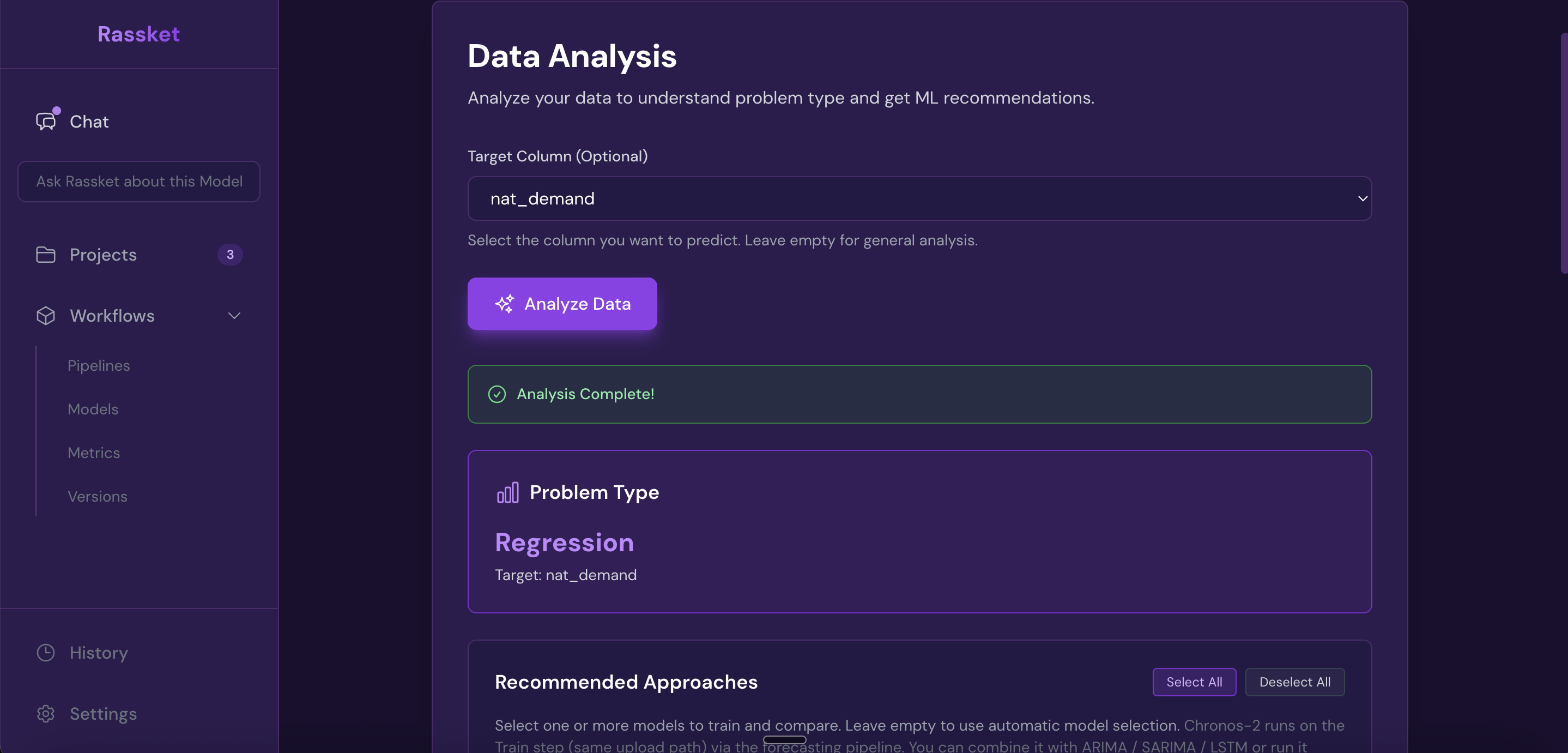
Rassket automatically detects your problem type — regression for continuous forecasts, classification for detection tasks.
4. Prediction Model Selection
- Algorithm library — selects from gradient boosting, tree-based, linear, and ensemble approaches
- Context-aware selection — chooses prediction models appropriate for your energy domain and problem type
- Ensemble methods — combines multiple prediction models when this improves accuracy
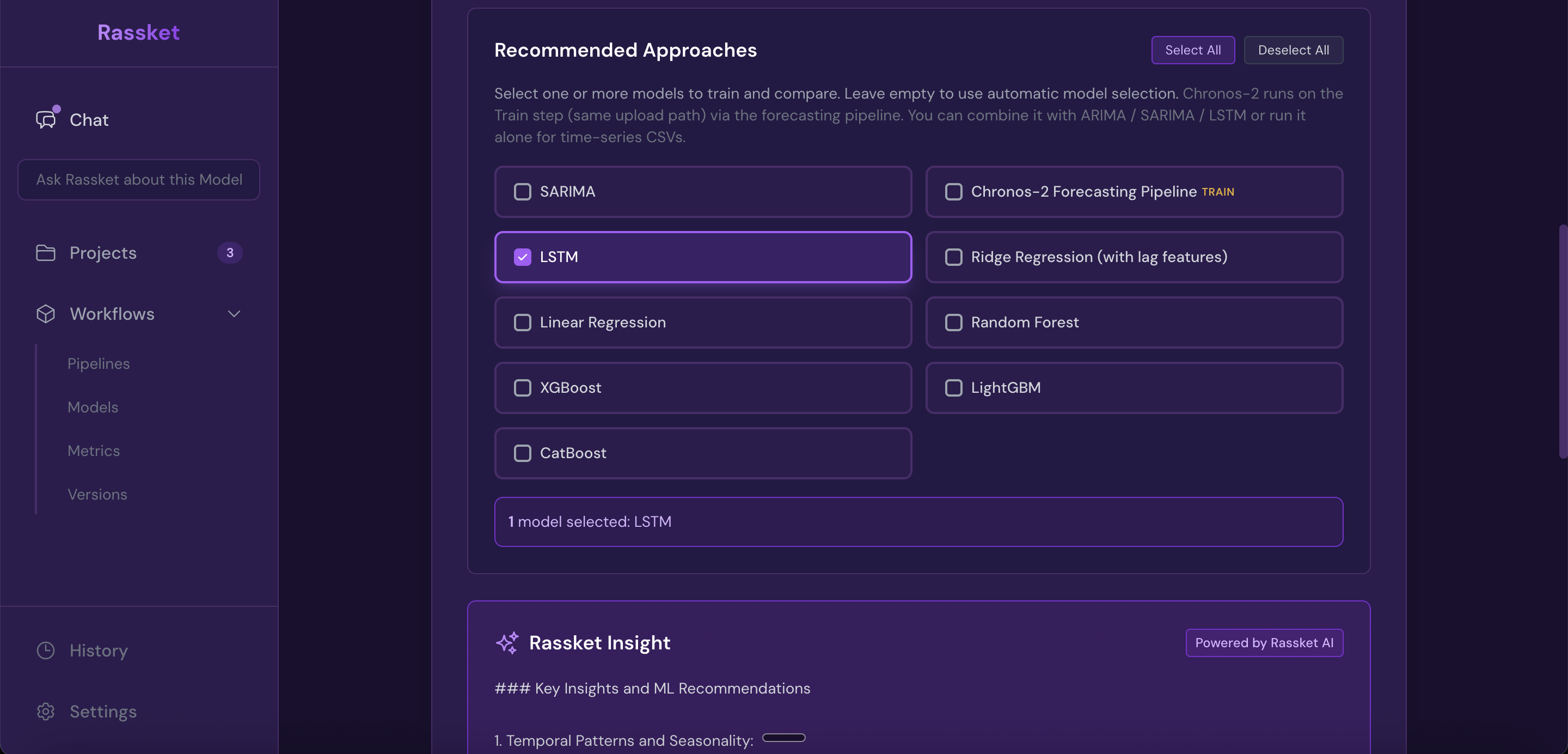
Rassket recommends the right prediction models for your energy use case — you can accept or adjust the selection.
5. Hyperparameter Optimization
- Automated tuning — uses Bayesian optimization to find the best model configuration
- Reasonable search ranges — automatically defined based on your dataset size and problem type
- Time-aware cross-validation — data is always split in time order so future data never leaks into training
- Early stopping — optimization stops when further improvement is unlikely
6. Overfitting and Leakage Detection
- Overfitting detection — flags models where the training score exceeds validation by more than 15% and applies corrections
- Data leakage detection — automatically identifies and removes features that contain information about future values
7. Prediction Model Evaluation
- Metric calculation — computes comprehensive evaluation metrics appropriate for energy forecasting
- Cross-validation — validates prediction model performance robustly across multiple time splits
- Feature importance — calculates which inputs drive the forecast using SHAP values
- Model diagnostics — performs statistical diagnostics to catch issues before export
What You Control
1. Energy Domain and Utility Context
You choose which of the five energy use cases best matches your data, and which utility company context to apply. This is the primary way you direct how Rassket builds your prediction model.
2. Target Column
You select which column you want to predict — for example, total load, generation output, or price. Everything else follows from this choice automatically.
3. Prediction Model Selection (Optional)
You can accept Rassket's automatic selection, or choose specific prediction models to train and compare. Most users find the automatic selection works well.
4. Your Data
You control what data you connect or upload. Rassket handles everything from there.
Prediction Engine Pipeline
- Data ingestion — upload file or connect database
- Domain selection — energy use case and utility context chosen
- Preprocessing — missing values, duplicates, data types, scaling
- Feature engineering — TOU windows, seasonality, lags, holiday indicators, weather interactions
- Leakage check — future-leaking features removed automatically
- Problem detection — regression vs. classification identified
- Prediction model selection — appropriate algorithms chosen for your use case
- Hyperparameter optimization — Bayesian optimization with time-aware cross-validation
- Overfitting check — training vs. validation gap flagged and corrected if needed
- Evaluation — comprehensive metrics and SHAP feature importance calculated
- Export — forecast curves, PDF report, CSV, and API ready
Performance Benchmarks
- 94.2% forecast accuracy on 12-month real grid data
- 80% reduction in modeling time vs traditional methods
- 40% reduction in forecast errors vs legacy spreadsheet approaches
- Under 30 minutes to first production forecast
Next Steps
- See the How It Works guide to walk through the workflow step by step
- Understand Outputs & Exports in detail
- Explore Use Cases for energy-specific examples